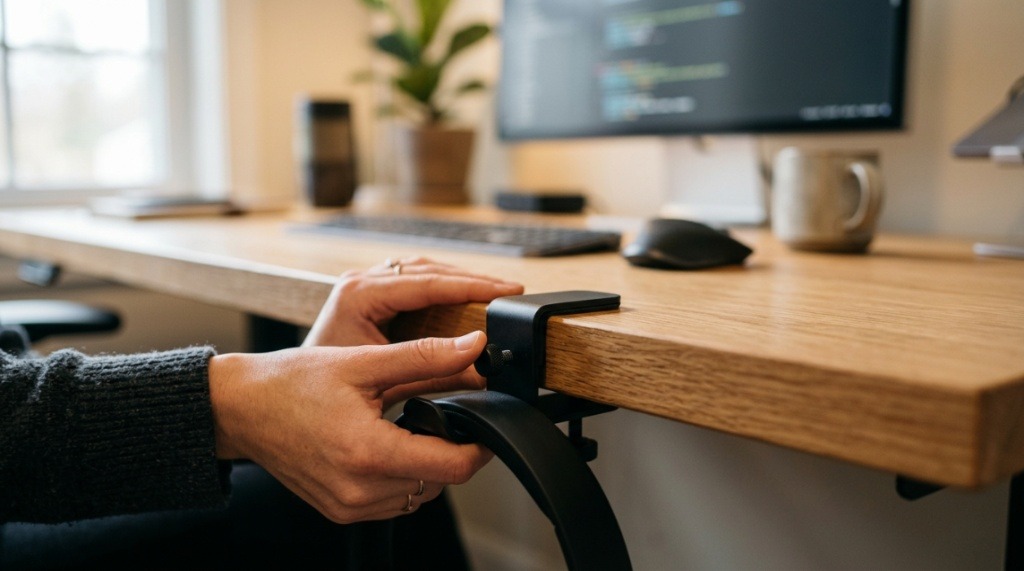
You sit down to work, coffee in hand, ready to crush your to-do list. But within minutes, you’re untangling a headphone cord from your mouse cable, shoving papers aside to find your notepad, and knocking over a water bottle because your headset is draped precariously across your keyboard. Sound familiar? A messy desk doesn’t just look bad—it kills productivity and adds unnecessary stress. The solution is simpler than you think: learning how to organize desk headset holders effectively. By dedicating a specific spot for your headphones, you reclaim surface space, protect your gear, and create a workflow that actually works for you. Let’s walk through the exact strategies, products, and setups that will transform your desk from chaotic to calm.
What Is a Desk Headset Holder and Why Do You Need One?
A desk headset holder is a dedicated accessory designed to store your headphones when they are not in use. It keeps your headset off the desk surface, preventing damage, tangles, and clutter. Whether you work from home, game, or take calls all day, a headset holder is a small investment with a big payoff.
The Core Problem It Solves
Headphones left on a desk take up valuable real estate. They get knocked onto the floor, stepped on, or buried under paperwork. A holder eliminates this risk by giving your headset a permanent, safe home.
Types of Headset Holders Available
There are several common styles: under-desk mounts that slide out of sight, standalone stands with a weighted base, clamp-on models that attach to the edge of your desk, and multi-purpose holders that also charge wireless headphones. Each type serves a different desk configuration, so choose based on your available space and workflow.
Who Benefits Most from a Headset Holder
Remote workers, call center agents, gamers, podcasters, and anyone with a hybrid office setup will immediately notice the difference. If you switch between headset and speakers multiple times a day, a holder makes that transition seamless.
How to Choose the Right Headset Holder for Your Desk Setup
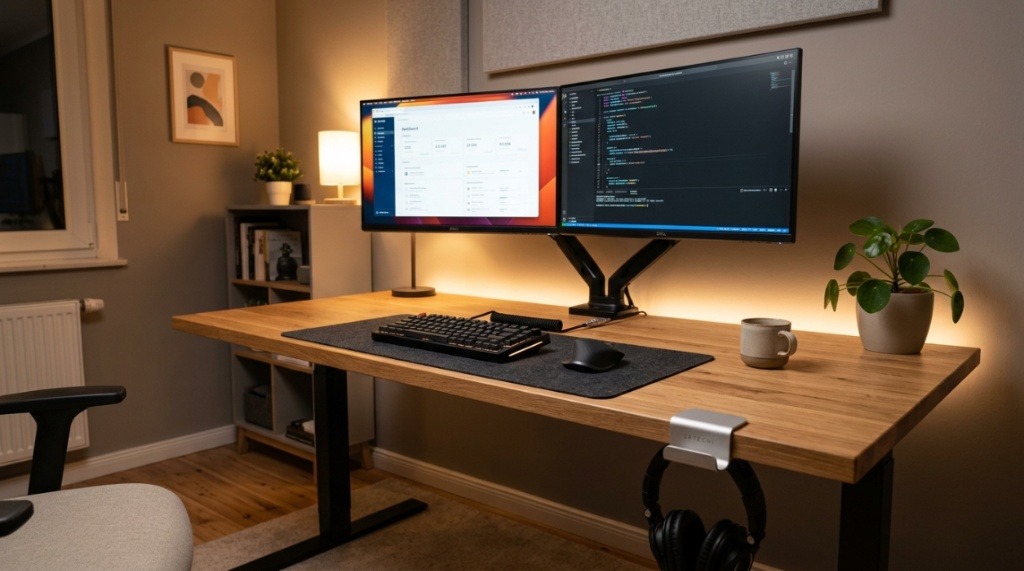
Selecting the perfect holder depends on three factors: your desk type, your headset size, and your personal style. A clunky holder on a minimalist desk defeats the purpose. Conversely, a tiny hook under a thick desk may not support a heavy gaming headset.
Assess Your Desk Space and Material
Measure the thickness of your desk edge if you plan to use a clamp-on holder. Some clamps only work with desks up to 2 inches thick. For glass desks, avoid clamps altogether and opt for adhesive or suction-cup models. Under-desk mounts work best on solid wood or metal surfaces.
Match the Holder to Your Headset Type
Over-ear headsets with thick padding require a wider hook or cradle. Lightweight earbuds or on-ear models can use a simple clip. Always check the weight capacity of the holder—most supports up to 2-3 pounds, which covers the vast majority of consumer headsets.
Consider Cable Management Features
Some holders include built-in cable routing channels or clips for your headphone cord. If you use a wired headset, this feature alone can eliminate the number one source of desk clutter: dangling cables. Wireless users can ignore this but should still look for a holder that doesn’t compress the ear cushions. For a broader perspective on designing intuitive environments beyond just physical hardware, read more about why the best UX lesson isn’t in a digital product.
Where Should You Place a Headset Holder on Your Desk?
Placement is everything. A poorly positioned holder defeats the purpose of organization. The ideal location balances easy access during calls with minimal interference during typing or reading.
The Dominant-Hand Rule
Place the holder on the same side as your dominant hand. If you are right-handed, install it on the right side of your desk near your monitor edge. This allows you to grab and replace the headset without twisting your body or reaching across your keyboard.
Under-Desk vs. On-Desk Placement
Under-desk holders are great for minimalist aesthetics and freeing up surface space. However, they require you to reach down to grab the headset, which may not suit users who take frequent calls. On-desk stands are more accessible but take up a small footprint. Test both positions for a week to see what feels natural.
Proximity to Your Monitor and Microphone
Avoid placing the holder directly in front of your monitor, as it can block your view. Also, keep it away from your microphone arm to prevent accidental knocks that could disrupt your audio input. A 6-inch buffer zone around the holder is a good rule of thumb.
What Are the Best Ways to Organize Desk Headset Holders Without Clutter?
Simply owning a holder is not enough. You must integrate it into your broader desk organization system. Otherwise, it becomes another accessory that adds visual noise instead of removing it.
Pair the Holder with a Cable Management System
Use adhesive cable clips or a cable sleeve to route your headphone wire neatly from the holder to your PC or audio interface. This prevents the wire from looping around your mouse mat or getting caught in your chair wheels. A clean cable path makes the entire setup look intentional.
Keep a Designated “Drop Zone” Around the Holder
Resist the urge to hang other items on the holder, such as keys, lanyards, or charging cables. The holder should be used exclusively for your headset. If you need a multi-purpose hook, buy a separate one. Keeping the holder dedicated prevents overloading and maintains easy one-handed access.
Rotate Ear Pads Regularly to Prevent Compression
When storing your headset on a stand that applies pressure to the ear pads, rotate the headset 180 degrees every few days. This extends the life of the padding and prevents permanent indentation that can affect comfort and sound isolation.
Can You Use a Headset Holder with a Standing Desk?
Absolutely. In fact, a headset holder is even more valuable on a standing desk because the surface area is typically smaller and more dynamic. However, you must account for movement.
Clamp-on Holders for Standing Desk Compatibility
Choose a clamp-on holder that stays securely attached when the desk rises and lowers. Avoid adhesive holders, as the vibration from movement can cause them to lose grip over time. A screw-down clamp provides the most stability.
Under-Desk Holders for Standing Desks
An under-desk mount works perfectly for standing desks because it moves with the desk and never interferes with your legroom. Ensure the mount does not interfere with the desk’s internal cables or motors. Check the underside clearance before permanent installation.
Testing Stability at Different Heights
Test your holder at both seated and standing height. Some clamp-on holders may wobble when the desk is at its highest setting. If you notice instability, tighten the clamp or consider a sturdier model. A falling headset is not just annoying—it can break expensive equipment.
How to Install a Headset Holder Step by Step
Installation is straightforward, but doing it correctly ensures long-term stability and prevents damage to your desk. Follow these steps for a professional-looking setup.
Step 1: Clean and Dry the Mounting Area
Wipe down the desk edge or underside with isopropyl alcohol to remove dust and oils. This is critical for adhesive mounts. For clamp mounts, a quick wipe ensures no grit scratches the surface during tightening.
Step 2: Mark the Exact Position
Hold the mount in place and mark the hole positions with a pencil if the mount requires screws. For clamps, place the holder in position and tighten just enough to hold it, then adjust for level before final tightening.
Step 3: Secure the Holder Tightly
For screw-in mounts, drill pilot holes to prevent wood splitting. For clamp mounts, tighten firmly but do not overtighten, especially on thinner desks where you could crack the surface. Once secure, test with your headset to ensure no wobble.
Step 4: Route Cables After Installation
Install cable management clips along the path from the holder to your desk grommet or cable tray. Plug in your headset and ensure the cable has enough slack for the full desk height range if you use a standing desk. Tuck any excess cable neatly.
What Common Mistakes Should You Avoid When Organizing Desk Headset Holders?
Even with the best intentions, small errors can make your organization system less effective. Avoid these pitfalls to get the full benefit of your headset holder.
Overloading the Holder with Multiple Items
Hanging a second pair of headphones or additional accessories on the same holder strains the mount and creates clutter. Use one holder per headset. If you own multiple headphones, invest in a multi-stand rack or use separate holders.
Choosing a Holder That Blocks Your Monitor
Tall, freestanding stands placed directly in front of a monitor can obstruct your view of the screen. Always measure the height of the stand plus your headset and compare it to your monitor’s bottom bezel height. You want a clear line of sight.
Ignoring the Weight of the Headset
Lightweight headsets can fall off shallow hooks. Heavy gaming headsets might slowly loosen adhesive mounts. Read product specifications carefully. If you own a heavy headset, opt for a clamp or screw-in mount over an adhesive model.
Neglecting Aesthetics in a Shared Office
If you work in a co-working space or office with an open layout, a bulky, mismatched holder can look unprofessional. Choose a holder that matches your desk finish—black, white, or metallic finishes generally blend with most professional environments.
How to Maintain Your Headset and Holder for Long-Term Use
A headset holder is low-maintenance, but a few simple habits will keep both the holder and your headphones in top condition. Neglect leads to dust buildup and mechanical wear.
Dust the Holder Weekly
Use a microfiber cloth to wipe down the holder, especially the hook or cradle area. Dust particles can scratch delicate headband materials over time. If your holder is metal, a quick polish keeps it looking new.
Check Tightness Monthly
Clamp-on and screw-in mounts can loosen slightly as wood expands and contracts with humidity. Once a month, give the clamp screw a quarter-turn to ensure it remains snug. For adhesive mounts, press firmly to re-secure the bond.
Clean Your Headset Ear Pads Regularly
Ear pads collect oil and sweat from your skin. When they sit on a holder, that buildup can transfer to the holder material. Wipe your ear pads with a damp cloth weekly and let them air dry before placing them back on the holder.
Which Headset Holders Pair Best with Specific Desk Configurations
Different desks call for different solutions. Matching the holder to your workspace avoids frustration and ensures a seamless installation.
Corner Desks and L-Shaped Setups
In a corner desk, the best spot is near the corner on your primary workstation side. Avoid placing the holder at the far end of the L, as you will have to lean or swivel to reach it. An under-desk mount works well here since corner desks often have limited surface area near the monitor.
Small or Narrow Desks
If your desk is less than 48 inches wide, a clamp-on holder attached to the side edge is ideal. This keeps the headset off the main surface and out of your immediate work zone. An under-desk mount is even better for the smallest desks.
Shared or Hot-Desk Environments
In shared offices, choose a portable freestanding stand that you can easily pack up at the end of your shift. Avoid permanent mounts, as they may not suit the next person using the desk. A weighted stand with a small footprint is both functional and courteous.
Why Combining a Headset Holder with Other Desk Organizers Creates a System
A headset holder works best as part of a coordinated desk organization strategy. Alone, it solves one problem. Combined with other tools, it creates a surface that stays clean all day.
Pair with a Monitor Stand for Height Alignment
Raising your monitor to eye level often frees up space underneath for a headset stand. A monitor riser with a built-in drawer or shelf can hold your holder or allow you to place a freestanding stand directly below the screen.
Use a Desk Tray or Drawer Organizer for Accessories
Keep your headset’s USB dongle, spare ear pads, and audio cable in a small drawer near the holder. This prevents those small items from cluttering the surface. The holder stores the headset; the drawer stores everything else.
Coordinate Colors and Materials
If your desk is white and your holder is black, it stands out visually. While not a functional issue, a cohesive look reduces visual clutter. Choose a holder color that matches your monitor, keyboard, or desk finish for a more polished workspace.
Ultimately, the best way to organize desk headset holders is to treat them as part of a broader productivity system—not just a place to hang your headphones. When you match the holder to your desk, install it correctly, and maintain both the holder and headset, you create a workspace that supports focus rather than fighting against it.
Frequently Asked Questions
Will a headset holder damage my headphones?
Not if you choose a holder with a wide, padded hook or cradle. Avoid narrow hooks that concentrate pressure on the headband. Rotate the ear pads periodically to prevent compression marks, and never hang a headset by the ear cups alone.
Can I use a headset holder for gaming headsets with thick padding?
Yes, as long as the holder has a large enough hook diameter and weight capacity. Gaming headsets often weigh more than office models, so check the specifications before purchasing. Look for holders rated for at least 2.5 pounds.
Is it better to mount the holder under the desk or on top?
Under-desk mounts save surface space and look cleaner, but they require you to reach down. On-desk stands are more convenient for frequent use. For most users, an on-desk clamp mount on the side is the best compromise between accessibility and space savings.
How do I clean a sticky adhesive headset holder residue?
Use isopropyl alcohol and a soft cloth to gently rub the residue away. Avoid using abrasive pads that can scratch your desk. For stubborn residue, let the alcohol sit for a few minutes before wiping.
Can I install a headset holder on a glass desk?
Yes, but avoid clamp-on models that can crack the glass. Instead, use suction-cup holders designed specifically for glass surfaces, or adhesive-backed holders applied to a glass-friendly surface. Ensure the glass is tempered and thick enough to support the weight.
Do I need a separate holder for wireless charging headphones?
Some holders include built-in wireless charging pads, which are excellent for maintaining battery life. If your headset supports Qi charging, a holder with a charging pad eliminates the need for separate cables and keeps your headset ready to use.
How many headset holders should I have on a single desk?
One per primary user is the standard rule. If multiple people share a desk, use one holder per person. Avoid stacking multiple headsets on a single holder, as this can cause damage and clutter.